Release 12.4.7
Additional Verification When Overbooking a Room Type
Stay is enhanced to improve the verification process that is followed when users overbook rooms from a room type. To enhance the current verification process, users with the required permission are prompted to enter their username and password in the Room Assignment section of the Book Reservation screen when overbooking a room type. The reservation is booked successfully after the user’s credentials are successfully authenticated.
This enhancement helps the property to determine if the overbooking is performed by the logged in user or by a different user. Previously, users with appropriate permissions could overbook rooms directly without any additional verification.
This verification process is applicable to overbookings performed in the Book a Reservation screen only.
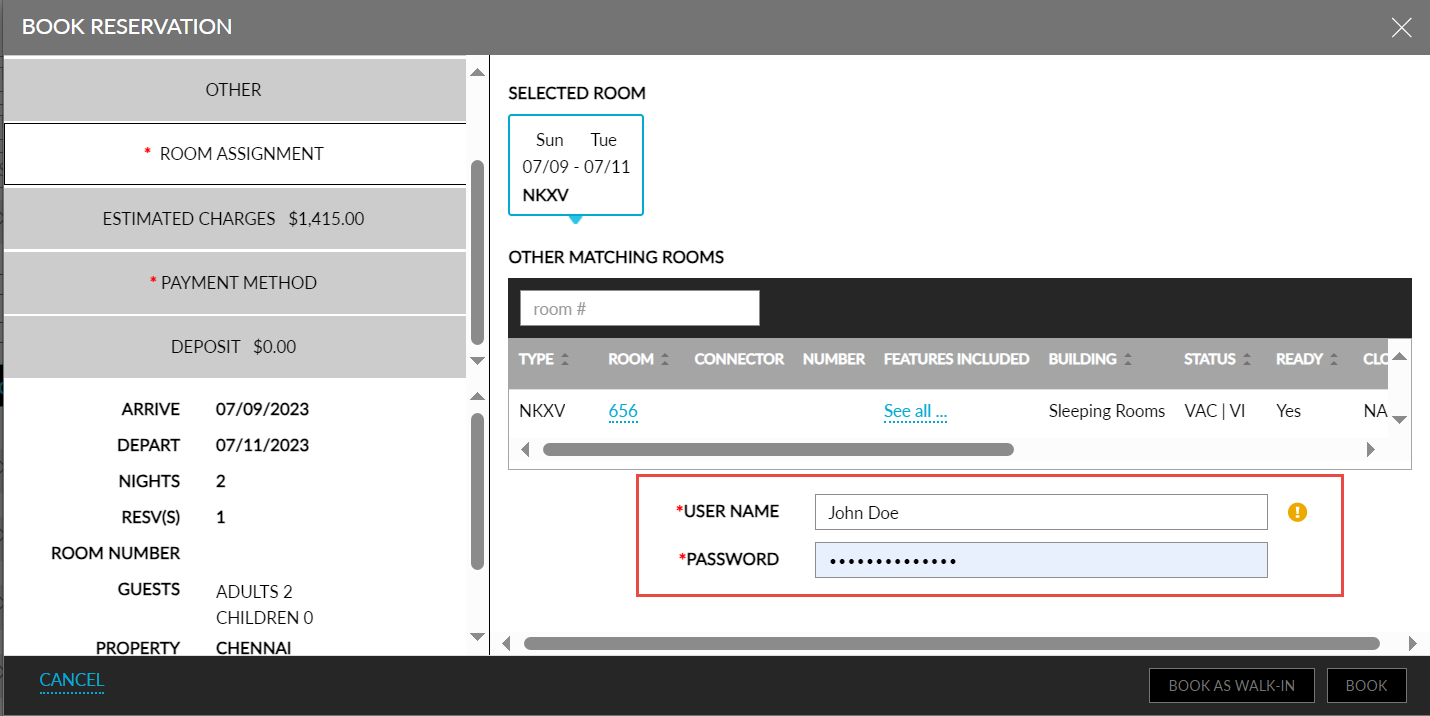
If there is a mismatch between the entered username and password, the following message is displayed: Username or Password/Passcode Invalid. When the user provides valid credentials but does not have the required permission, the message, User does not have permission, is displayed. The reservation is created successfully after successful authentication of the entered credentials.
This authentication is mandatory only when a room type is overbooked. Users are not prompted to authenticate themselves otherwise.
When the Approver Code option is enabled for the customer and user in Agilysys Platform, users can enter their username and the configured approver code in the username and passcode fields to authenticate themselves and proceed with the overbooking.
A record for the overbooking is created in the Audit Log screen for the Entity Type, Reservation, and an overbooked indicator is displayed adjacent to the room type in the Currently Selected Room section of the reservation for which overbooking is performed.